Before you choose
The stack under your store
A store platform is more than a theme and a checkout. Under every research peptide store sits a stack of decisions somebody else made: what you are allowed to sell, how your catalog is shaped, where your rules are checked, who owns the address and the data, and what the AI is allowed to do on its own. You live with those decisions every day, and the expensive ones are hard to see on a feature page.
This guide walks the stack from the bottom up, five questions in all. Where it talks about other platforms, it quotes their own pages, dated, in the sources at the foot. We make a platform too, so the scorecard at the end works on any of them, ours included.
Layer 1 · Allowed to trade
Do its rules, and its payment partner's, allow research peptide sales at all?
What to look forStart at the bottom. A platform that fails the first layer fails all of them, however good the rest looks.
Press a layer to see the question it raises, then jump to it. Steps with a Watch button play the same moment in the video.
Part 1
Is the trade allowed at all?
The question that decides every other one. A store builder's own rules may say little about research peptides; the payments service bundled with it often says much more.
A store builder and the payments that come with it have separate rules, and it is usually the payments side that draws the line. Some name peptides and research chemicals outright. Others prohibit “pseudo-pharmaceuticals” or incorrectly labeled research chemicals, and leave it to their risk team to decide what fits. Here is what six of them say on their own pages.
The payments service that comes with it
WooCommerce with WooPayments
Lists peptides and other research chemicals among the products its payments service will not process, beside pseudo-pharmaceuticals and supplements with unsupported claims. WooCommerce itself is software you run; the rule belongs to its payments service.[1]
“Peptides and other research chemicals”
It says it may restrict or shut down the account.
If it goes wrong
What a closed account can cost
A platform that decides it does not want your business can act quickly, and its terms say what happens next. These are the platforms’ own words, not worst cases we imagined.
Up to 100%
of the money from a sale can be held in a reserve
Shopify Payments’ terms allow a reserve of up to the full amount of the money from a sale, and funds can be held after termination too.[4]
30 days
until archived data may be deleted
Commerce, formerly BigCommerce, after it ends an account.[12] Lightspeed, which now runs Ecwid, may delete it at once.[13]
48 hours
to find a new way to take payment
What some beauty brands were given when Shopify Payments dropped them as “pseudo pharmaceuticals” in 2017. One store closed for over a week.[14]
It can also outlast the account: Shopify’s payments terms say processors report terminated merchants to the card schemes’ lists where the card rules require it, which can make the next provider harder to find.[4] Squarespace can withhold payouts after termination until it judges the risk cleared.[10] And when you close a Shopify store yourself, its data is kept for two years, though its help page does not cover stores Shopify closes.[6]
- Ask the platform, and its payments provider, whether research peptides sold for research use only are allowed. Keep the reply.
- Keep your own copy of your catalog, customers and orders, so a closed account is a bad week and not the end.
- Know where you would take payments next, before you need to.
Part 2
Does it fit the trade?
A research catalog has structure a general shop flattens: sizes, tiers, limits, batches and certificates. And its rules only count if they hold at checkout.
- 01
A catalog model that fits the trade
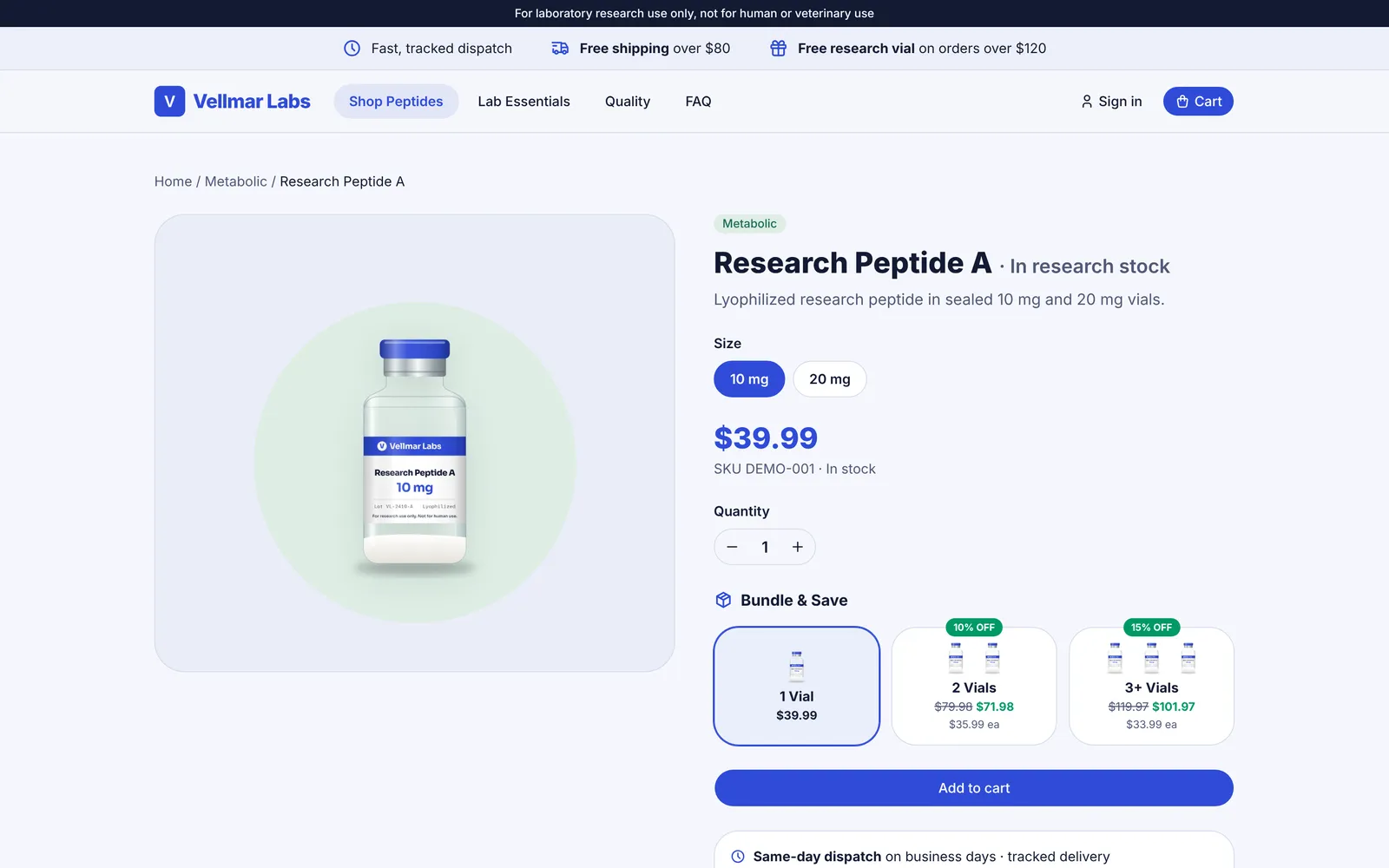
Research catalogs have structure a generic product model flattens: several sizes per listing, each with its own price and stock; volume tiers per size, priced in the basket; a limit per order, explained before checkout; the right unit for each listing; and stock counted per batch.
Ask for: Ask to see one listing with two sizes, tiers and a limit, and where its batches are kept.
In My-Pepts: Sizes, Bundle & Save tiers, limits per size and stock per batch are part of every listing.
- 02
Certificates as records, not attachments
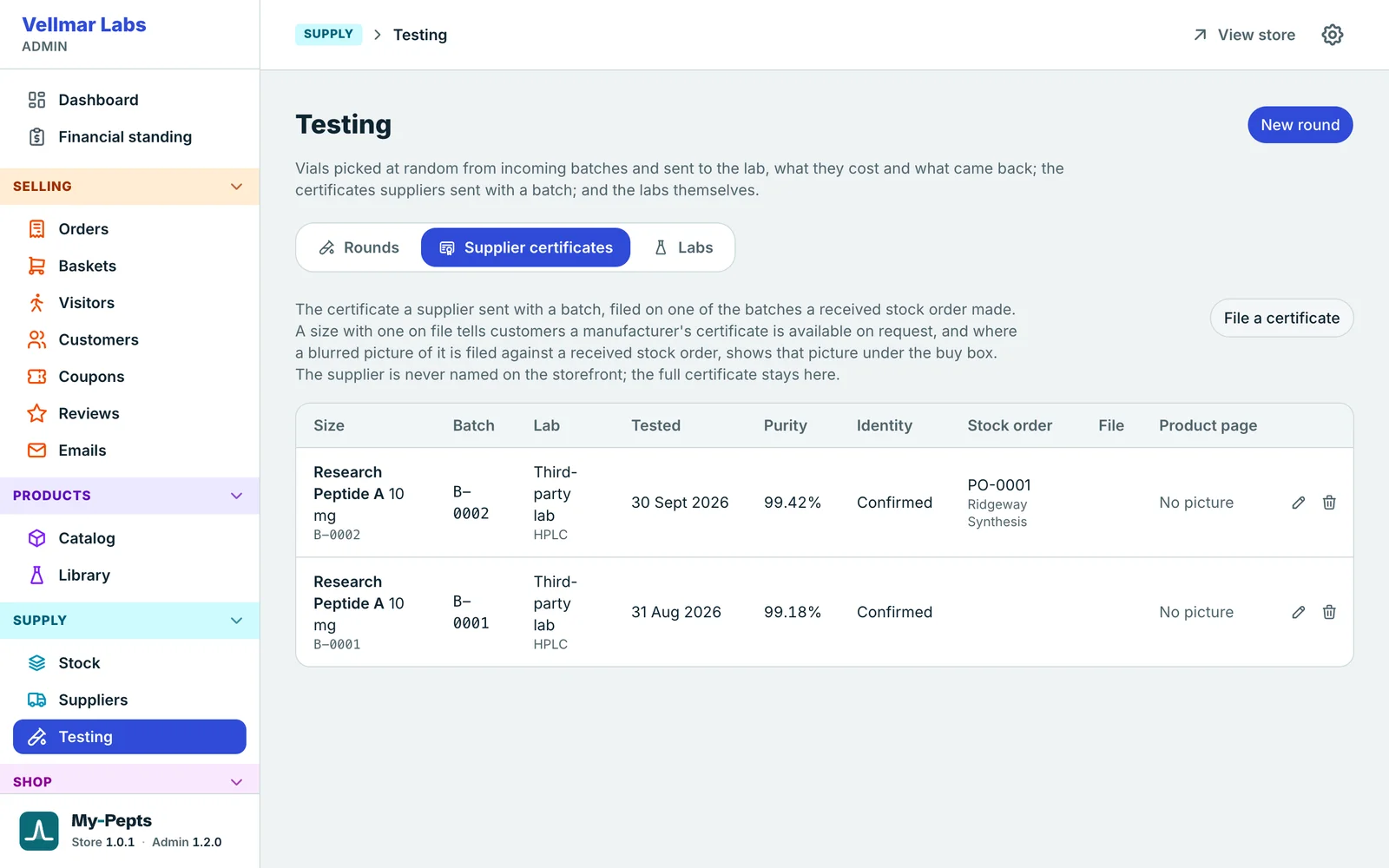
A certificate pasted into a product description goes out of date, covers a batch you no longer sell, or shows for a size it never tested. A platform built for this treats a certificate as a record tied to a batch and the date of its test, shown only when you publish it, and easy to send to a customer who asks.
Ask for: Every certificate on the store points at a batch you are selling.
In My-Pepts: Certificates are filed on the batch, their private fields blurred in your browser before they are saved, with independent results beside them.
- 03
Rules checked when the order is placed
A minimum order, a delivery charge and a free-delivery threshold are simple ideas. What matters is where they are checked. If only the page knows them, an old browser tab or a crafted request can place an order under rules you have changed.
Ask for: The rules are settings you change, checked again by the server for every order.
In My-Pepts: Minimum order, free shipping and free gift thresholds are set in the admin and applied by checkout itself.
Cart subtotal$124.97Minimum$25Free shipping$80Free vial$120 - 04
Tools that keep your promises for you
Research use only on every page, a store that stays private until you open it, ad pages that make no claims, ad and analytics tags that wait for consent, and marketing email checked against consent when it is sent. None of it replaces legal advice; it stops the store undoing the policies you wrote.
Ask for: Nothing the platform does on its own contradicts your research-use terms.
In My-Pepts: Every page says research use only, a password wall keeps the store private until launch, and campaigns reach only subscribers, checked at send time.
Vellmar LabsThis store is in private preview.Access password••••••
Try it
Why the server has to check
The rules in a basket are easy to show and easy to skip. Security testers try exactly this on any shop: changing a price or a quantity on its way to checkout, and seeing whether the server notices.[18] The standard advice is that checks in the browser are for the shopper’s convenience, and every value has to be checked again on the server.[19] Raise the minimum order below, then place the order from a tab that still shows the old one.
It was $30 when the shopper opened the page.
Checked only in the browser
Press the button to place the order.
Checked again on the server
Press the button to place the order.
After the sale
The day behind the store
A platform also decides how much of your day it covers. A storefront that only takes orders leaves you to pack, reply, restock, advertise and email with other tools. Ask how far it goes:
Part 3
Is it yours?
Your address, your inbox and your data. Each should be yours from the start, and none should depend on the platform's goodwill.
- 01
Start on its address, then move to your own domain
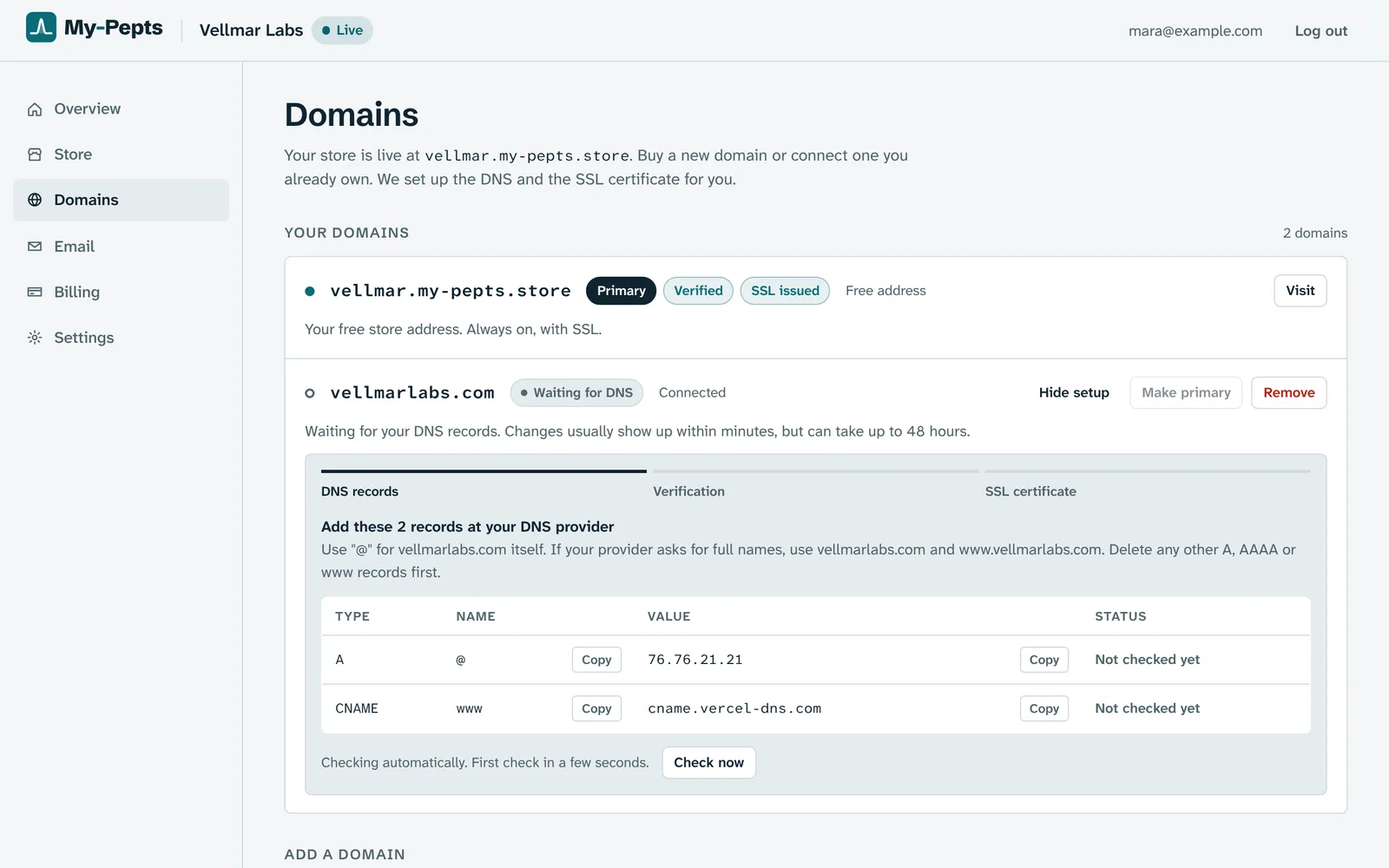
You should be able to open on the platform's address the same day, and connect a domain of your own whenever you are ready, without losing anything on the way.
Ask for: The domain is registered to you, and connecting it is a couple of records, not a migration.
In My-Pepts: Every lab starts live on its own address with SSL. Connect your own domain from the Domains page by adding the two records it shows, and the certificate is issued for you.
- 02
Email from your own address, set up to arrive
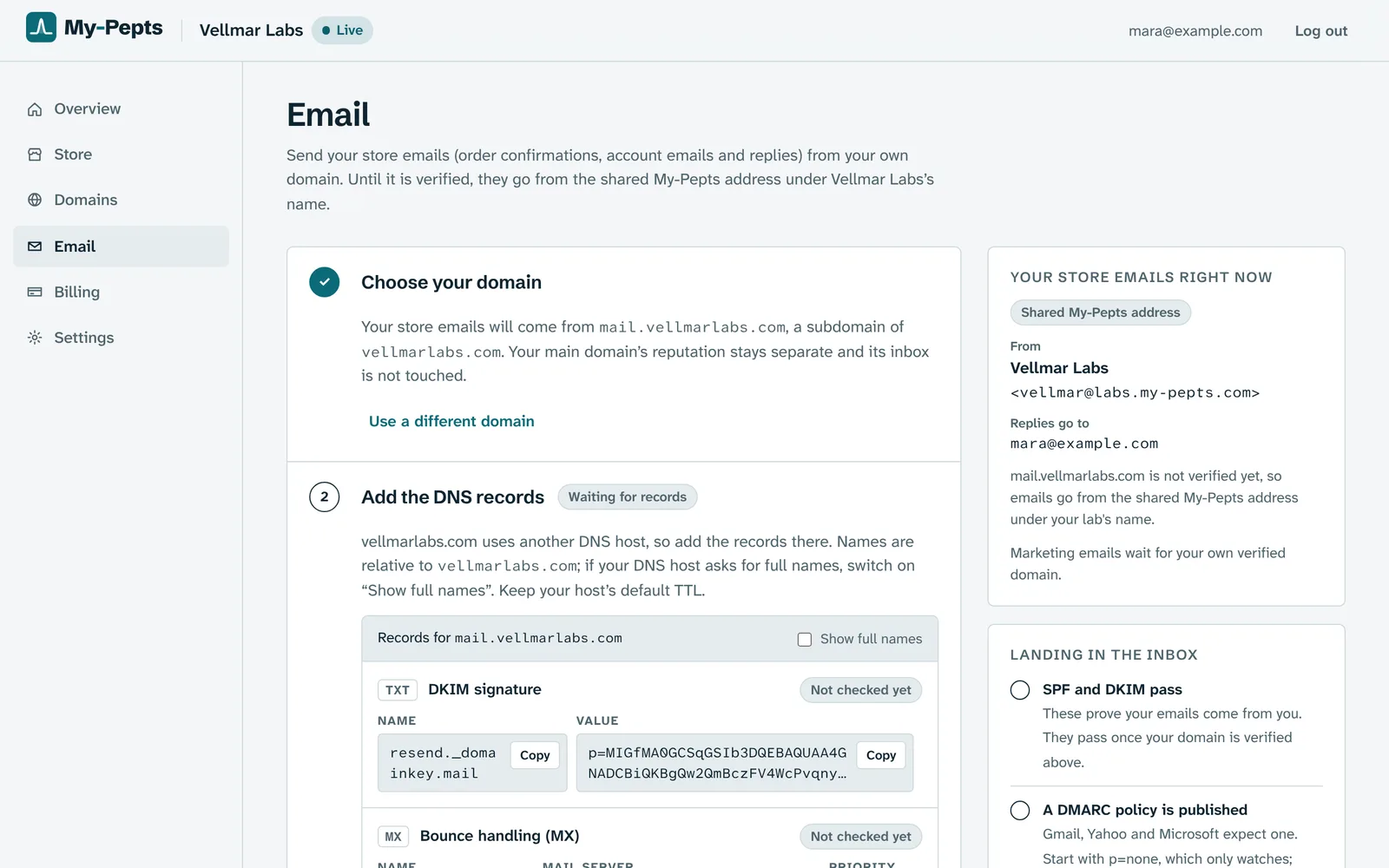
Order confirmations, receipts and campaigns should come from your name, with the records that prove they are yours, so they reach the inbox rather than the spam folder.
Ask for: Your sending domain passes SPF and DKIM, and publishes a DMARC policy.
In My-Pepts: Add the records the Email page shows; once the domain is verified, order emails and campaigns go out under your lab's name, from a subdomain that helps keep your main domain's reputation separate.
Try it
Email that reaches the inbox
Order confirmations and tracking only help if they arrive. The big inbox providers now ask more of anyone who sends in volume. Gmail asks every sender for SPF or DKIM and a spam rate under 0.3%, and anyone sending 5,000 or more messages a day to Gmail for SPF, DKIM, a DMARC policy and one-click unsubscribe.[21] Since November 2025 it has stepped up enforcement, rejecting more of the mail that falls short.[22] Yahoo asks bulk senders for the same and to honor unsubscribes within two days,[23] and Outlook has rejected mail from high-volume senders without SPF, DKIM and DMARC since May 2025.[24]
Add the records a My-Pepts lab is asked for, one at a time, and see what each one unlocks.
- DKIMTXT
resend._domainkey.mail.vellmarlabs.com
p=MIGfMA0GCSqGSIb3DQEB…IDAQAB
A signature only your domain can make, so an inbox can tell the email really came from you and was not changed on the way.
- Return pathMX
send.mail.vellmarlabs.com
10 feedback-smtp.eu-west-1.amazonses.com
Where bounces and complaints come back, so an address that no longer works stops getting mail.
- SPFTXT
send.mail.vellmarlabs.com
v=spf1 include:amazonses.com ~all
The servers allowed to send for your domain. Mail from anywhere else fails the check.
- DMARCTXT
_dmarc.mail.vellmarlabs.com
v=DMARC1; p=none;
Tells inboxes what to do with mail that fails the checks. p=none only watches, so it can never block your own mail.
Order emails go out in your lab's name
Until these three are in, store mail cannot be sent from your domain.
Needs: DKIM, Return path, SPF
Campaigns meet the big inboxes' sender rules
Bulk senders need SPF, DKIM and a published DMARC policy, or campaigns land in spam or bounce.
Needs: DKIM, SPF, DMARC
Try it
Kept apart from every other store
On a platform, your store sits beside thousands of others. The UK’s National Cyber Security Centre says a provider should make sure one customer’s service cannot access or affect another’s, and be able to explain how.[25] Security guidance for shared software warns that a single vulnerability can expose every customer’s data at once.[26] Press the button below to see the difference.
Every My-Pepts lab runs on its own address, with its own database and its own admin, so a problem in one store is designed to stay in that store.
The exit
If you ever leave
A platform you cannot leave is one you cannot argue with. Before you sign, find out how you would take your catalog, customers and orders with you, and how long the data stays after an account closes. Then take a copy now and then, whether you plan to leave or not. On My-Pepts, a read-only key for your own tools reaches your catalog, orders and customers, so you can take a copy whenever you like.
Part 4
AI and your own tools
AI can take hours out of the day behind a store. The question is not whether a platform has it, but whether it waits for you.
- 01
AI that drafts, and waits for you
AI is genuinely useful here: a reply drafted with the order and certificates in view, a supplier's quote read into a stock order, a campaign written from the products you picked. What matters is that it stops at a draft.
Ask for: Nothing is sent, ordered or changed until a person presses the button.
In My-Pepts: Claude drafts replies, campaigns and stock orders from your own data, and every draft waits for you. Prices always come from your catalog, never from the AI.
Prepared photo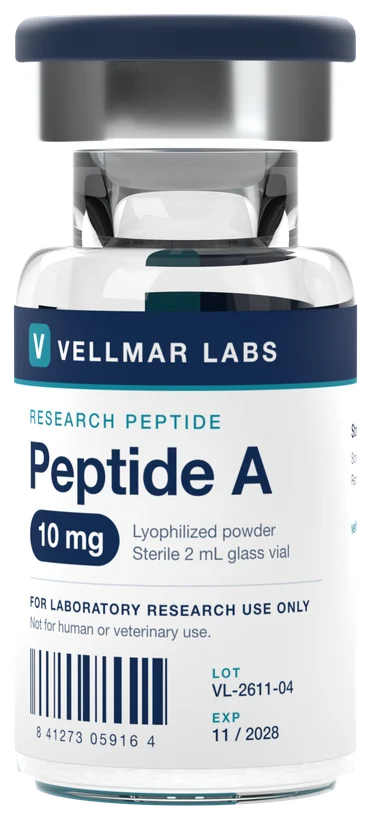
Try it
Drafts, not agents
The risk with AI that acts on its own has a name in security circles: excessive agency, where a tool does damage because a model’s output was wrong, ambiguous or manipulated. OWASP’s advice is to give it only the permissions it needs and to require a person to approve high-impact actions before they happen.[27] The UK government’s AI playbook goes further: AI output should not automatically lead to actions like sending email or changing records, and a person should review them.[28] Switch the mode below to see the difference.
From Leah, about order PEP-2AC5V5
“Hi, has my order shipped? And could you send the certificate for my batch?”
Draft, waiting for you
Hi Leah, your parcel left us on Tuesday and was scanned this morning; it is due tomorrow. Here is the tracking link. The certificate for your batch, RA10-2609-B, is attached as you asked.
A person presses Send
The assistant does the slow part: it finds the order, the tracking and the certificate, and writes the reply. Nothing reaches the customer, the bank or a supplier until you have read it. A wrong guess costs you a second, not a refund.
Your own tools
Keys you control
Sooner or later you may want your own scripts or an AI assistant to work with your store, perhaps through the Model Context Protocol, an open standard for connecting AI apps to tools and data, whose specification tells apps to get a person’s explicit consent before using a tool.[30] Whatever connects, the key it uses should reach your store and nothing else, and every request should be checked against what that key may touch: the first item on OWASP’s list of API risks.[29]
mpk_vellmar_…9f2c
Your assistant's key
- Your catalog and pricesread
- Your orders and customersread
- Your stock and supplier ordersread
- Your store settingsread
- Another lab's storeno access
- The platform's own adminno access
Changes go through the same checks as the admin, as the person who made the key.
On My-Pepts, an owner or admin makes and revokes keys on the Connectors page. A key is read only or allowed to make changes, can be limited to some areas and given an end date, acts as the person who made it, and stops working when that person is no longer an admin.
Summing up
Score any platform, ours included
Ten questions, three of them deal-breakers. Answer them for a platform you are considering, then copy the list and send it to its sales team: a good platform will be glad to answer in writing.
0 of 10 answered
Answer a few more
The score settles once at least half the questions have an answer.
A rule of thumb, not legal or technical advice: the deal-breakers and weights follow the checks in this guide. Nothing you pick is saved or sent.